QustPOS
A complete business management platform with Restaurant POS, Retail POS, inventory, purchases, staff management, and powerful reports — built by QQust.
• What is QustPOS?
Sell smarter.
Move faster.
QustPOS is a web-based business management platform developed by QQust. Restaurant POS and Retail POS share the same modern checkout design — you pick the options that fit your business.
Beyond the counter, manage inventory and stock, record supplier purchases, assign staff roles, track customers and suppliers, and generate detailed sales, purchase, and profit reports — all from one sidebar.
Contact us about QustPOS
• Two POS Options
Same design. Restaurant or Retail options.
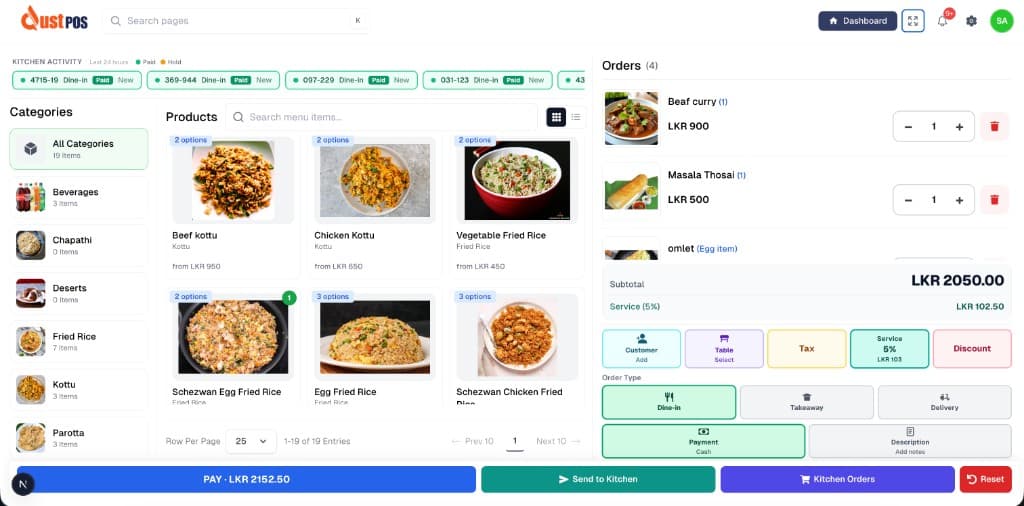
Restaurant POS and Retail POS use the same clean interface. Switch the mode in Sales and enable the options you need — kitchen & tables for restaurants, barcodes & stock for retail.
Restaurant POS
Same POS screen, tuned for restaurants, cafés, and food stalls — with kitchen and table options enabled.
- ✓Kitchen order tracking & send-to-kitchen
- ✓Dine-in, Takeaway & Delivery modes
- ✓Table selection & service charge
- ✓Menu categories with product variants
- ✓Live kitchen activity board
Retail POS
Same design and checkout flow — with retail options for shops, barcodes, and stock-linked sales.
- ✓Barcode scanner integration
- ✓Brand & category management
- ✓Stock-linked product sales
- ✓Invoice generation & printing
- ✓Multi-payment checkout
• Full Dashboard
Everything in one sidebar.
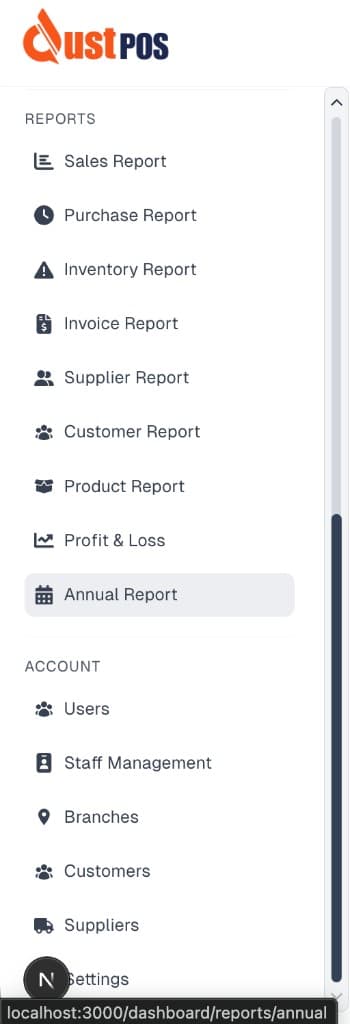
QustPOS is more than a checkout screen. The dashboard sidebar gives you full control over inventory, sales, purchases, reports, staff, and account settings — organised into clear sections.
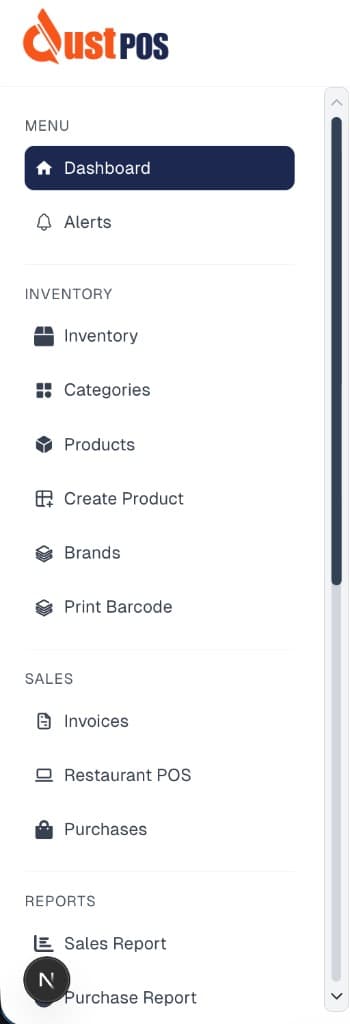
Menu
- Dashboard
- Alerts
Inventory
- Inventory
- Categories
- Products
- Create Product
- Brands
- Print Barcode
Sales
- Invoices
- Restaurant POS
- Retail POS
- Purchases
Reports
- Sales Report
- Purchase Report
- Inventory Report
- Invoice Report
- Supplier Report
- Customer Report
- Product Report
- Profit & Loss
- Annual Report
Account
- Users
- Staff Management
- Branches
- Customers
- Suppliers
- Settings
• Key Features
POS, inventory & management.
Staff Management
Add staff, assign roles, and control who can access POS, inventory, reports, and account settings.
Inventory & Stock
Track stock levels, manage categories and brands, create products, and print barcodes — all in one place.
Purchase Management
Record supplier purchases, update stock automatically, and keep a full audit trail of every inbound order.
Multiple Payment Methods
Accept Cash, Debit Card, and Account Transfer — all from a single unified checkout screen.
Tax & Discount Control
Apply percentage-based tax, service charges, and discounts per order with automatic subtotal updates.
Barcode Scanner Ready
Scan product barcodes directly from the POS screen for fast, error-free retail checkout every time.
Product Variants & Options
Sell products with multiple options (size, type, etc.). Set variant-level pricing with ease.
Reports & Analytics
Sales, purchase, inventory, profit & loss, and annual reports — get the full picture of your business.
• How It Works
Simple workflow. Powerful results.
Set Up Your Business
Add products, categories, brands, and stock. Configure suppliers, customers, branches, and staff roles from the dashboard.
Sell with POS
Open the same POS screen in Restaurant or Retail mode — enable kitchen & tables for food service, or barcodes & invoicing for shops.
Track & Report
Record purchases, monitor inventory levels, and review sales, profit & loss, and annual reports anytime.
• See it in action
One POS design for Restaurant and Retail — with the options your business needs.
• Get in Touch
Interested in QustPOS? Let's talk.